After signing in you land on Home.
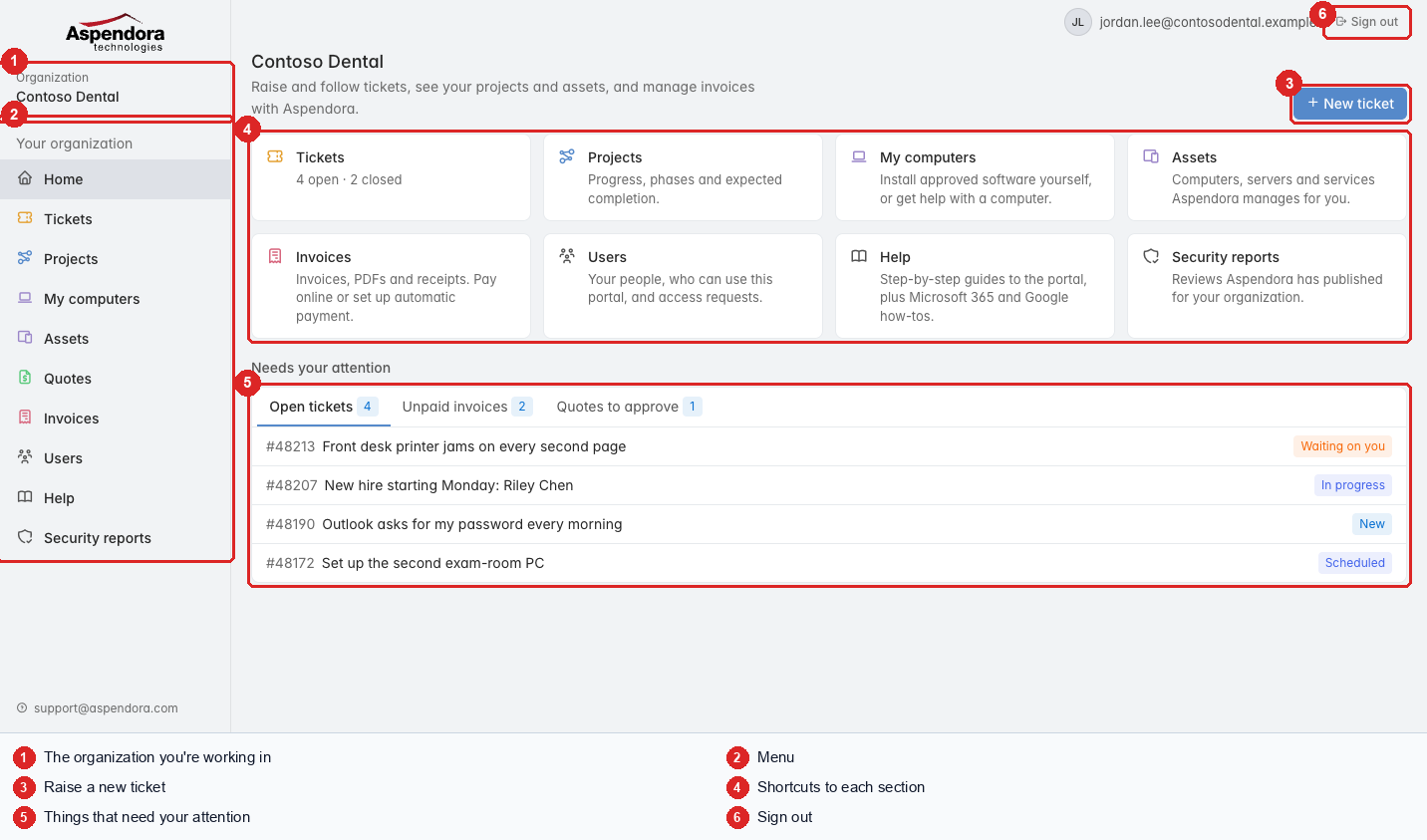
- Organization: the organization you're working in.
- Menu: every section of the portal. You only see the sections your role allows.
- New ticket: the quickest way to ask Aspendora for help.
- Shortcuts to each section, with a one-line description. The Tickets shortcut shows how many tickets are open and closed.
- Needs your attention: three tabs:
- Open tickets: the latest five, with their status. Choose one to open it.
- Unpaid invoices (administrators): what's due, and when it will be charged if you use automatic payment.
- Quotes to approve: quotes waiting for a decision.
- Sign out.
The menu
| Menu item | What it's for | Who sees it |
|---|---|---|
| Home | This page | Everyone |
| Tickets | Your tickets and new requests | Everyone |
| Projects | Projects Aspendora is running for you | Everyone (standard users: projects they're the contact for) |
| Assets | Computers and devices | Managers, administrators |
| Quotes | Quotes and service orders | Everyone (standard users: quotes addressed to them) |
| Invoices | Invoices and payments | Administrators |
| Users | Who can use the portal | Administrators |
| Help | This help, plus how-tos for Microsoft 365 and Google | Everyone |
| Security reports | Security reviews Aspendora has published for you | Managers, administrators |
On a phone, the menu moves to the top of the page and scrolls sideways.