The Aspendora portal is where you work with Aspendora Technologies, your IT team. Use it to:
- Raise a ticket when something isn't working, or ask for something new (a user, a laptop, software).
- Follow your tickets: see who's working on them, read every update, and reply.
- See your projects: how far along they are and when they'll be finished.
- See your computers and devices (managers and administrators), with warranty dates.
- Review and sign quotes from Aspendora.
- Pay invoices and set up automatic payment (administrators).
- Decide who in your organization can use the portal (administrators).
The portal is at portal.aspendora.com. It works on phones, tablets and computers.
Where to start
- Sign in with your work Microsoft 365 account, or with a code we email you.
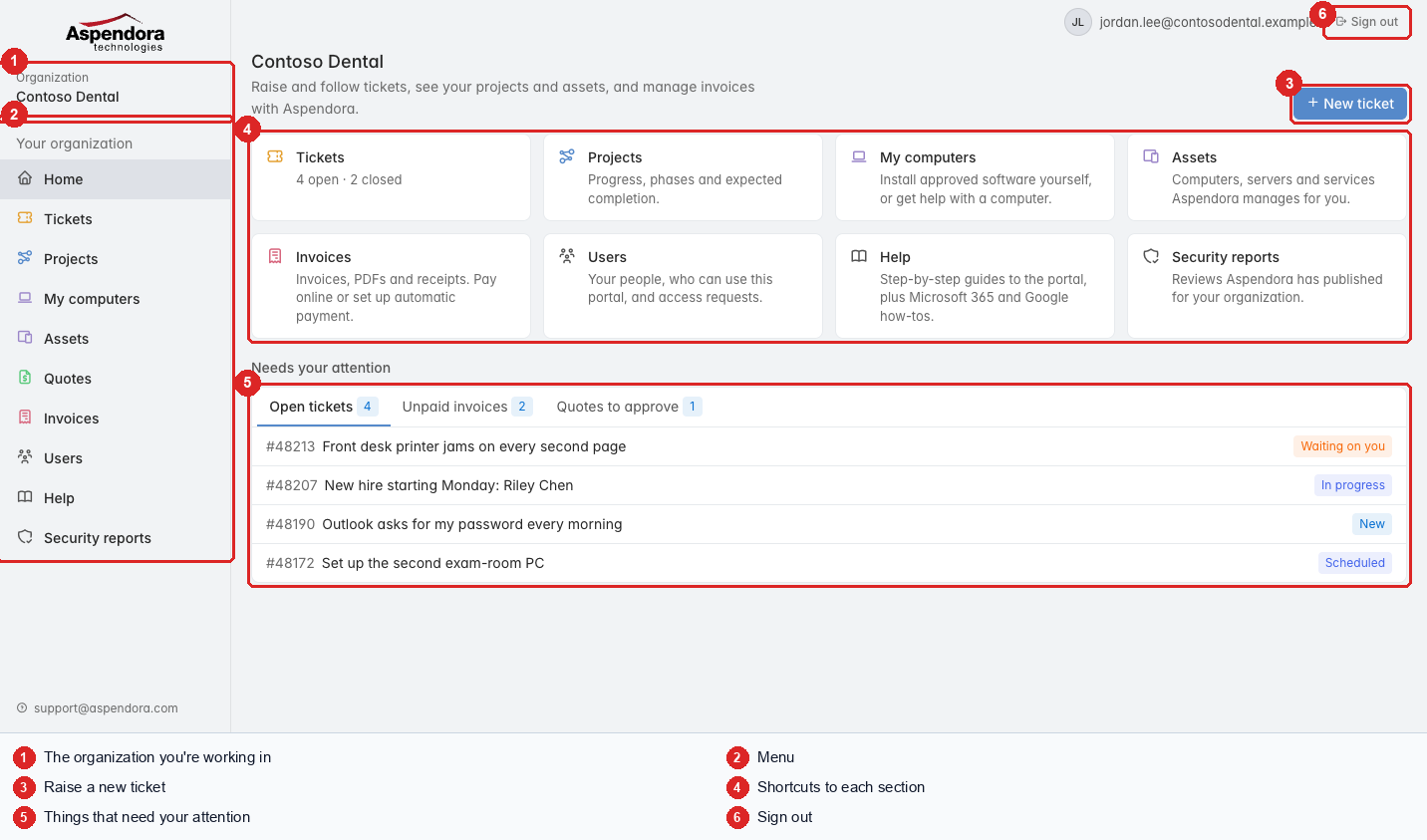
- Look at the Home page: it shows anything that needs your attention.
- Need help with something? Raise a ticket.
Tip: for an emergency (nobody can work, a security problem), raise the ticket and call us at 281-941-4028.
What you see depends on your role
Everyone can raise and follow their own tickets. Managers also see the whole organization's tickets, projects and assets. Administrators also manage invoices and who can use the portal. See Who can see what.